 AI TL;DR
Too lazy to read? Summarize this post with:
Blog Post Publish Date: 2026/11/12
OpenSearch Storage Tiering for Log Analytics: A Hands-On Guide#
This blog post is a hands-on implementation of storage tiering in OpenSearch, using a log analytics scenario based on my experience. In the example, log indexes move through three tiers: hot nodes on local NVMe for the first 3 days, warm nodes on EBS until 90 days, and S3 snapshots that come back as searchable snapshots only when someone needs old data. You will configure the node attributes, index template, and Index State Management (ISM) policy that automate the flow, and see how I run the searchable tier on short-lived Kubernetes nodes and which costs and failures I ran into.
Why I Split the Cluster Into Tiers#
I built the tiering for two reasons: cost and performance. Logs have an inconvenient access pattern. The newest data is queried all the time, the oldest is almost never touched, and you still have to keep it. My hot tier runs on EC2 Instance Store (local NVMe), the approach I described in OpenSearch + EC2 Instance Store: A Disruptive Approach to Hot Tier Storage. Local NVMe gave the best performance for data up to 3 days old. After that, queries become rare enough that cheaper EBS disks on warm nodes handle them well.
Long-term retention was harder, because for years OpenSearch had no good answer for it. I wanted searchable snapshots before the feature existed, and in the meantime I kept an in-house solution of Python and shell scripts that duplicated every log into OpenSearch and into S3 as a raw long-term copy. It was horrible to maintain. Even then, I took snapshots of every index, betting on the Searchable Remote Index RFC that was open in the project.
Searchable snapshots shipped as experimental in OpenSearch 2.4 and became generally available in 2.7, in May 2023. I was possibly one of the first to run them in production, and that is where I learned how they work in practice. Some of what I learned was missing from the documentation, so I contributed it: PR #4597 documented the search node role on the cluster setup page and fixed the searchable snapshot example, and PR #12892 documented that node.search.cache.size accepts a percentage.
Tiers Are Node Attributes You Define#
Apart from the warm node role used by searchable snapshots, OpenSearch does not know what a hot or warm tier is. Hot, warm, and cold are a naming convention for a setup with three storage layers. Whoever runs the cluster decides how many layers it has, what hardware each one uses, and what to call them. Two layers is a valid design, and so is five.
Tiering in OpenSearch rests on node attributes. Each data node carries a custom attribute that you choose, such as node.attr.temp: hot, and each index carries an allocation filter that requires a value of that attribute. OpenSearch places the index’s shards only on nodes whose attribute matches the filter. To move an index to another tier, you change the filter, and OpenSearch relocates the shards to the nodes that match. The index template and the ISM policy in the rest of this post exist to set that filter and change it at the right time.
Three Tiers for Log Analytics#
Tier |
Hardware profile |
Role |
Typical retention for log analytics |
|---|---|---|---|
Hot |
Local NVMe (Instance Store), high CPU, limited capacity |
Active indexing and near-real-time search |
First 3 days |
Warm |
Large network-attached disk (EBS), lower CPU |
Long-term retention, slower queries |
Up to 90 days |
Searchable (cold) |
On-demand nodes backed by object storage (S3) |
Rarely queried data, restored on demand |
As long as the snapshot is kept |
The table describes a common OpenSearch scenario, log analytics, which is the one I have experience with. The retention values are an example from that scenario, not a rule. In any setup the hot tier should hold a much shorter window than the other tiers, and the exact values depend on how your data is queried.
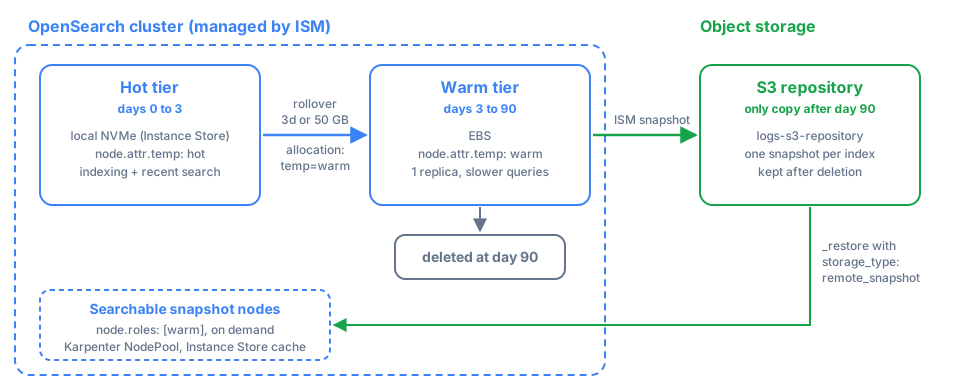
Data flows in one direction. Fresh logs land on hot nodes, roll over and move to warm nodes after a few days, get snapshotted to S3, and are eventually deleted from the cluster. The snapshot stays in S3, and when someone needs that data again it comes back as a searchable snapshot, pulled into compute only while it is being queried.
Prerequisites: Label Your Nodes#
From here on, the post builds the log analytics example step by step, with indexes named my-logs-*. Tag each data node with a custom attribute, conventionally temp, so OpenSearch knows which nodes are hot and which are warm. Set it in each node’s opensearch.yml, or through the environment if you run in containers:
# On every hot data node
node.attr.temp: hot
# On every warm data node
node.attr.temp: warm
The attribute name is arbitrary. What matters is that it is consistent across the cluster, because OpenSearch uses it later to pin shards to a tier. Shard allocation awareness in Step 1 needs a second attribute with the node’s availability zone, for example node.attr.zone: us-east-1a.
For the searchable tier, you need at least one node with the warm node role. That role is what hosts searchable snapshots. A warm node reserves part of its disk as a cache for the snapshot data it reads from S3, sized by node.search.cache.size. The value is a byte size such as 50gb or a percentage of the disk such as 10%. On a node that has only the warm role, it defaults to 80% of the available storage, according to the searchable snapshots documentation:
# On every searchable snapshot node
node.roles: [ warm ]
# Optional on a dedicated node, where the default is 80% of the disk
node.search.cache.size: 80%
About the naming overlap:
The
warmnode role is the OpenSearch feature behind searchable snapshots. In OpenSearch 2.x it was calledsearch, and the rename was a breaking change in 3.0: thesearchrole now means something else (nodes for search-only shards), so update node roles before upgrading. None of this is related to the customnode.attr.temp: warmattribute used for the EBS warm tier. In most deployments these are separate node groups.
Step 1: Set Up Shard Allocation Awareness#
Before moving data around, make sure a shard’s copies are spread across availability zones. This is independent of tiering, but you do not want a primary and its replica in the same zone. Once every node has node.attr.zone set, tell OpenSearch to use it:
PUT _cluster/settings
{
  "persistent": {
    "cluster.routing.allocation.awareness.attributes": "zone"
  }
}
With this in place, OpenSearch places the copies of each shard in different zones, so losing one zone does not lose data, as long as the index has at least one replica.
Step 2: Pin New Indexes to the Hot Tier#
Every new index should land on hot nodes. A shard allocation filter is an index setting that restricts which nodes can hold the index’s shards, based on node attributes. You don’t set it per index by hand. You put it in an index template, so every index matching the pattern inherits it:
PUT _index_template/my-logs-template
{
  "index_patterns": ["my-logs-*"],
  "template": {
    "settings": {
      "index.routing.allocation.require.temp": "hot",
      "plugins.index_state_management.rollover_alias": "my-logs"
    }
  }
}
The require filter means shards can only be placed on nodes whose temp attribute equals hot. It is one of several allocation deciders that OpenSearch checks before placing a shard, alongside disk watermarks, which I covered in OpenSearch Shard Allocation: Balanced by Count, Rebalanced by Watermarks. That post also explains why global watermarks are a problem in a tiered cluster like this one. The rollover_alias setting tells ISM which alias to roll over, which Step 6 uses.
Step 3: Understand the ISM State Machine#
Index State Management (ISM) is the OpenSearch plugin that automates operations on indexes as they age, and it is the engine behind automatic tiering. An ISM policy is a small state machine with three building blocks:
State: a status the index can be in, such as
hot,warm, ordelete. An index is in exactly one state at a time.Action: an operation that runs when the index enters a state, such as
rollover,snapshot,replica_count,allocation, ordelete. Actions run in the order you declare them.Transition: the condition that moves the index to the next state, for example reaching a minimum age.
Once a policy is attached, ISM runs a background job for each managed index, every 5 minutes by default (ISM settings). The job runs the current state’s actions, evaluates the transition conditions, and moves the index forward when they are met.
Step 4: Register the S3 Snapshot Repository#
Before an index is deleted from the cluster, the policy copies it to S3 with a snapshot, so the repository has to exist before the policy runs. Register it once:
PUT _snapshot/logs-s3-repository
{
  "type": "s3",
  "settings": {
    "bucket": "my-opensearch-snapshots",
    "base_path": "logs"
  }
}
Step 5: Write the Tiering Policy#
Here is the complete hot to warm to delete policy, with the snapshot to S3 in the warm state:
PUT _plugins/_ism/policies/logs_tiering_policy
{
  "policy": {
    "description": "Hot -> Warm -> Delete lifecycle for time-series logs",
    "default_state": "hot",
    "states": [
      {
        "name": "hot",
        "actions": [
          {
            "rollover": {
              "min_index_age": "3d",
              "min_primary_shard_size": "50gb"
            }
          }
        ],
        "transitions": [
          {
            "state_name": "warm"
          }
        ]
      },
      {
        "name": "warm",
        "actions": [
          {
            "replica_count": {
              "number_of_replicas": 1
            }
          },
          {
            "allocation": {
              "require": { "temp": "warm" }
            }
          },
          {
            "snapshot": {
              "repository": "logs-s3-repository",
              "snapshot": "{{ctx.index}}"
            }
          }
        ],
        "transitions": [
          {
            "state_name": "delete",
            "conditions": {
              "min_index_age": "90d"
            }
          }
        ]
      },
      {
        "name": "delete",
        "actions": [
          {
            "delete": {}
          }
        ]
      }
    ],
    "ism_template": {
      "index_patterns": ["my-logs-*"],
      "priority": 100
    }
  }
}
In the hot state, the rollover action creates a new write index once the current one is 3 days old or its primary shard reaches 50 GB, whichever comes first. The hot transition has no condition, so right after the rollover the old index moves to warm.
In the warm state, three actions run in order. replica_count sets the replicas to 1, because older data needs less redundancy headroom and the saved disk adds up. Then allocation with require: { temp: warm } replaces the hot filter from the template, and OpenSearch relocates the shards to the warm (EBS) nodes. Last, snapshot copies the index to the logs-s3-repository repository. The index stays on the warm nodes until it is 90 days old, then the delete state removes it from the cluster. The snapshot in S3 is not touched, and Step 7 brings it back when needed.
The ism_template block attaches the policy to every new index that matches my-logs-*, so you never attach it by hand. It only applies to indexes created after the policy exists, which is why the policy comes before the first index.
Step 6: Bootstrap the First Index and the Write Alias#
The rollover action needs a write alias that it can move from the current index to the next one. Create the first index with that alias:
PUT my-logs-000001
{
  "aliases": {
    "my-logs": {
      "is_write_index": true
    }
  }
}
The index inherits the hot allocation filter and the rollover alias from the template, and the ISM policy from the ism_template. From now on, your application writes to the my-logs alias, never to a specific index. When the rollover fires, OpenSearch creates my-logs-000002, moves the write alias to it, and ISM starts moving the old index to warm.
Confirm that the shards landed on hot nodes and that the policy is attached:
GET _cat/shards/my-logs-000001?v
GET _plugins/_ism/explain/my-logs-000001
Step 7: Restore Old Data as a Searchable Snapshot#
The policy deletes each index from the cluster at 90 days, but its snapshot stays in S3. Often you must keep old data longer, for compliance or for the occasional investigation, without paying for warm nodes to hold it. A searchable snapshot is an index restored from a snapshot repository while its data stays in remote storage, such as S3. Compute is attached only when someone queries it.
ISM appends a timestamp to the snapshot name, so the snapshot for my-logs-000001 is named something like my-logs-000001-2026.11.15-14:05:12.345. List the repository to find the exact name before restoring:
GET _cat/snapshots/logs-s3-repository?v
After the index is deleted from the cluster, you can bring it back on demand as a searchable snapshot:
POST _snapshot/logs-s3-repository/<snapshot-name>/_restore
{
  "storage_type": "remote_snapshot",
  "indices": "my-logs-000001",
  "index_settings": {
    "index.number_of_replicas": 0
  }
}
storage_type: remote_snapshot is the difference from a normal restore. Instead of downloading the whole index to local disk, OpenSearch loads the index into the cluster while S3 remains the authoritative copy of the data, and it downloads and caches segments locally as queries need them. This requires at least one node with the warm role from the prerequisites.
I restore searchable snapshots with zero replicas. The snapshot was taken in the warm state with 1 replica, and without index_settings the restored index keeps that value. A replica would only duplicate a cache, because the data is already safe in S3. The trade-off is availability: if the node holding the shard goes down, the index is unavailable and the cluster turns red until the node comes back. When it rejoins, OpenSearch allocates the shard again from the snapshot in S3. For an index that someone queries during an occasional investigation, I accept that.
How I Run the Searchable Tier on Kubernetes#
I don’t keep warm-role nodes running all the time. When a process needed logs that had already been rotated to S3, I created a Karpenter NodePool only for searchable snapshots, brought up an OpenSearch node with the warm role on it, restored the snapshots, and removed the NodePool once the work was done. I paid for that compute only while someone was looking at old data.
That node used Instance Store, not EBS. The local disk on a warm node only holds the cache of data read from S3, and S3 is what guarantees durability. Paying for EBS durability on a disk that only holds a cache made no sense to me. If the node disappears, the cache goes with it, and the data is still in S3.
Test Searchable Snapshots on Every Upgrade#
The worst problem I had with this setup came from an OpenSearch upgrade. After one version bump, the restore behavior of searchable snapshots changed and restores started failing with errors. It turned out to be a bug in that version, and a later release fixed it.
Searchable snapshots are the tier you touch least, which makes them easy to forget in an upgrade checklist. If they matter to you, add a test to every OpenSearch upgrade: restore a known snapshot with storage_type: remote_snapshot and run a query against it before you call the upgrade done.
Operational Tips#
Watch the transitions.
GET _plugins/_ism/explain/<index>shows the state of each managed index and why it has not transitioned yet.Monitor shard movement. While indexes move from hot to warm,
GET _cat/shards?v&s=stateshowsRELOCATINGshards. Large migrations consume I/O and network, so schedule big retention changes off-peak. The same relocation mechanics apply when you remove nodes, as in Scaling Down and Resizing OpenSearch Data Nodes Without Losing Data.Size rollover by shard size, not only by age. A 50 GB primary shard cap keeps shards in a healthy range through traffic spikes. Keep the age condition too, so quiet indexes still roll over.
Keep at least one replica on hot. The hot tier is where you can least afford data loss, especially on ephemeral local NVMe. If replicas are new to you, start with OpenSearch Concepts: Index and Shards. Drop to zero replicas only on tiers where you can restore from a snapshot.
ISM pauses on red. ISM does not run jobs while the cluster health is red. If transitions seem stuck, check cluster health first.
What I Would Do Differently#
If I built this again, I would start by trying to simplify as much as possible and asking whether I really need several storage layers. Each tier adds complexity, and each one consumes CPU, memory, and above all network. Every index that moves from hot to warm is copied across the network, replicas are copied again, and snapshots are uploaded to S3. On AWS that traffic shows up on the bill. In my experience, replication and data migration between tiers can increase AWS costs considerably, enough that a three-tier design is worth justifying with your own access patterns before you build it.
When the access pattern does justify it, as it did for me, tiering works well. New data stays fast on NVMe, older data gets cheap on EBS, and the oldest data costs only S3 storage until someone needs it. The searchable tier also replaced the in-house scripts I used to maintain with a restore call.
Key Takeaways#
Hot, warm, and cold are a convention. The cluster admin defines how many storage layers exist, and each layer is a value of a custom node attribute (
node.attr.temp) that shard allocation filters require.An index template pins new indexes to hot nodes and sets the rollover alias. The ISM policy moves them to warm by replacing that filter.
Create the ISM policy before the first index, because
ism_templateonly attaches to indexes created after it.The ISM
snapshotaction copies each index to S3 before deletion, and appends a timestamp to the snapshot name.Restoring with
storage_type: remote_snapshotkeeps the data in S3 and needs nodes with thewarmrole (searchin OpenSearch 2.x). Their cache size is set withnode.search.cache.size.Searchable snapshot nodes can be short-lived and run on Instance Store, because their disk only holds a cache and S3 holds the data.
Test a searchable snapshot restore on every OpenSearch upgrade. A version bug once broke my restores after an upgrade.
Each tier costs CPU, memory, and network. On AWS, replication and migration between tiers can raise the bill considerably, so justify every layer.
References#
I’m Carlos Neto, and I’ve been running OpenSearch on EKS for over five years. More about me on my home page. If you have questions or a different approach, contact me on LinkedIn.