 AI TL;DR
Too lazy to read? Summarize this post with:
Blog Post Publish Date: 2026/11/19
Helm Global Values: The Right Way to Share Values with Subcharts#
In Helm, global values are the values under the reserved global key, and every chart and subchart can read them. Each subchart normally sees only its own block of values. In this post I explain why I took global for a naming convention, what Helm actually does with it, and how I used it to set one image tag for the five modules of an umbrella chart.
Why I Thought global Was Just a Convention#
I first saw global in the External Secrets Operator chart. Its global block holds keys such as podLabels, imagePullSecrets, and repository, and a value set there applies to every deployment of the chart. Since the name suggests something that applies to everything, I took it as a naming convention with no mechanism behind it. Then I found the same block in Bitnami charts, such as the Fluent Bit chart with imageRegistry and imagePullSecrets, which reinforced that idea.
In a single chart, that is mostly true. The values reach every deployment because the chart's templates read .Values.global, and any other key name would work the same way. What I missed is that Helm treats global differently when a chart has subcharts. The comment above the Bitnami block hints at it, saying these values override the image parameters "including dependencies".
What Helm Does with global#
The Helm documentation on subcharts and globals cleared it up for me. To see why global exists, start with how Helm scopes values in a parent chart, or umbrella chart, that declares other charts as dependencies.
The parent's values.yaml configures each subchart under a key with the subchart's name. Helm passes each subchart only its own block, without the prefix, so a subchart template reads .Values.replicaCount, not .Values.mysubchart.replicaCount. In the documentation's words, "a subchart cannot access the values of its parent."
global is the exception. Helm reserves Values.global for values that "can be accessed from any chart or subchart by exactly the same name", so a value under global in the parent reaches every subchart as .Values.global.<name>. A naming convention can't do that, because any other key in the parent is invisible to the subchart unless it sits in the subchart's block.
The charts reference adds three rules. Globals flow down to subcharts and their subcharts, never up, so a subchart can't change the parent's values. When the parent and a subchart define the same global, the parent wins. And globals must be declared explicitly, so you can't use an existing non-global key as a global.
Here is the same parent values.yaml seen from each side, for a subchart imported as billing:
Where the value is set in the parent |
Path in the parent templates |
Path in the |
|---|---|---|
|
|
Not visible |
|
|
|
|
|
|
Sharing One Image Tag Across Five Modules#
global clicked for me with an internal application at work. I wrote a chart for it and an umbrella chart that imports that chart five times, one per application module, each with its own values. The umbrella works like a bounded context for the modules. All five run the same container image, and I didn't want to repeat the tag in every module's values.
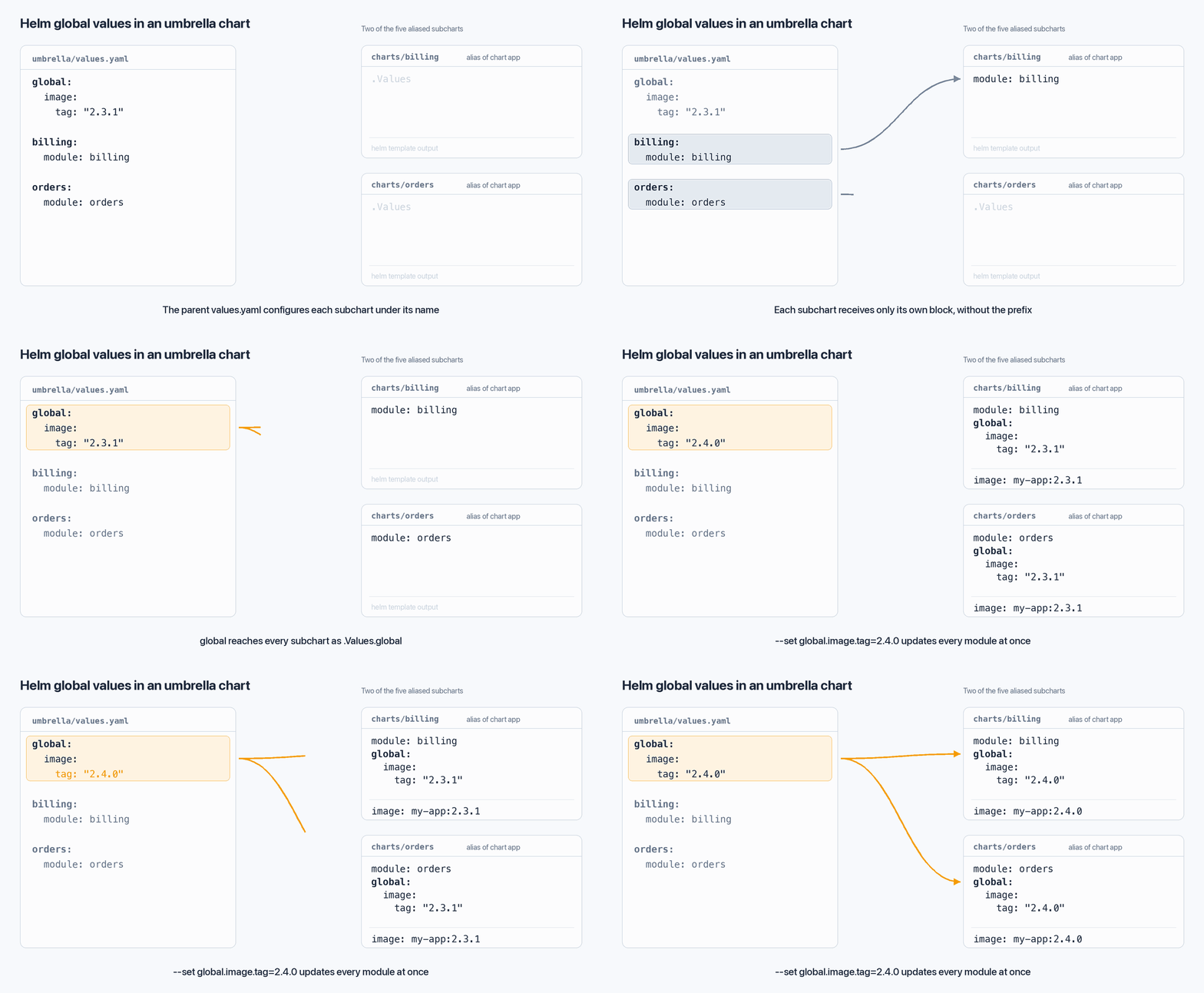
The umbrella chart imports the application chart once per module with alias, the dependency field for adding the same chart more than once. The names are examples, and the snippet shows two of the five modules:
# umbrella/Chart.yaml
apiVersion: v2
name: my-app-bundle
version: 0.1.0
dependencies:
  - name: app
    alias: billing
    version: 0.1.0
  - name: app
    alias: orders
    version: 0.1.0
The tag lives once, under global at the root of the umbrella values. Each module block only has its own settings:
# umbrella/values.yaml
global:
  image:
    tag: "2.3.1"

billing:
  module: billing

orders:
  module: orders
The application template uses the global tag when it is set and falls back to the chart's own value:
# app/templates/deployment.yaml
image: "{{ .Values.image.repository }}:{{ .Values.global.image.tag | default .Values.image.tag }}"
The application chart also declares the global key in its values.yaml, with an empty default:
# app/values.yaml
global:
  image:
    tag: ""

module: ""

image:
  repository: registry.example.com/my-app
  tag: "1.0.0"
Without that default, rendering the application chart alone fails, because .Values.global.image doesn't exist. With Helm v4.3.1, the error is:
Error: app/templates/deployment.yaml:10:59
  executing "app/templates/deployment.yaml" at <.Values.global.image.tag>:
    nil pointer evaluating interface {}.image
With the default in place, helm template renders both modules with the global tag:
helm template rel ./umbrella | grep image:
image: "registry.example.com/my-app:2.3.1"
image: "registry.example.com/my-app:2.3.1"
Bumping every module now takes one value, such as --set global.image.tag=2.4.0, and the application chart still works standalone with its own image.tag. To check which values each subchart receives after the merge, the JSON dump from Helm Tips: Inspect Your Chart Context with JSON shows global inside each subchart's .Values. For how I decide what to template in the application chart, see Helm Charts: Development Practices from a Programmer's Perspective.
Why YAML Anchors Were Not Enough#
It took me a while to see this. Before, I shared parameters across module blocks with YAML anchors, defining the tag once with &tag and referencing it with *tag. Anchors only resolve inside the file being parsed, so when I split the umbrella values into more than one file, a file passed with -f couldn't reference an anchor from another one. global doesn't have that limit, because Helm merges all values files before passing the global block to the subcharts.
Key Takeaways#
globalis a reserved key that any chart or subchart reads as.Values.global.<name>.Subcharts see only their own block of the parent's values, except for
global.Inside a single chart,
globalis a regular value that reaches only the templates that read it.Globals flow from parent to subcharts, never up, and the parent's value wins.
An umbrella chart that imports the same chart several times with
aliascan set a shared value, such as the image tag, once underglobal.A subchart that reads a global should declare it with an empty default, or it fails to render on its own.
YAML anchors only resolve inside one file and break when values are split across files.
References#
I'm Carlos Neto, and this blog is where I share my experiences and open source contributions. More about me on my home page. If you have questions or a different approach, contact me on LinkedIn.